How AI Is Changing the Way People Edit and Create Videos
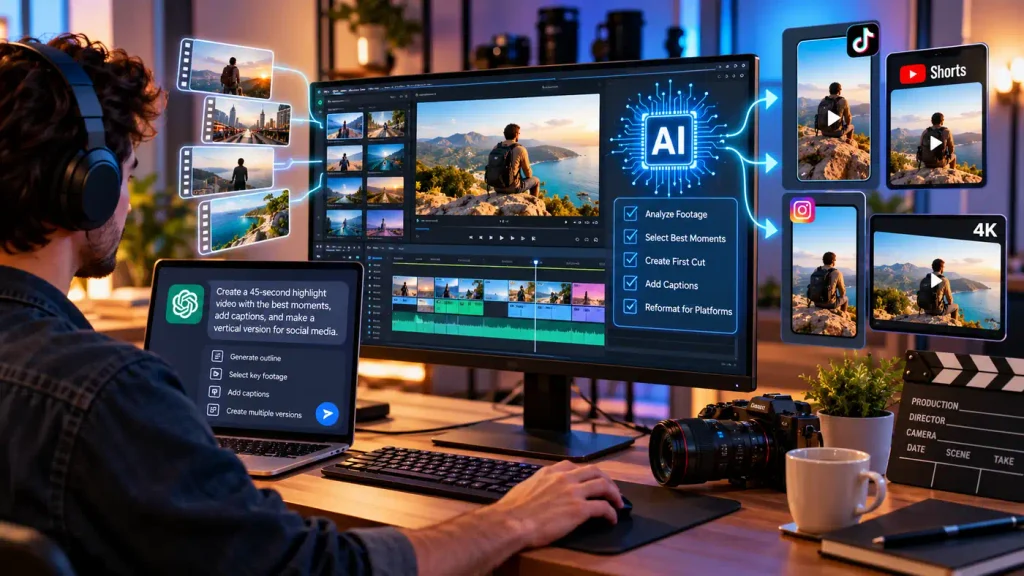
Video editing has always been a mix of technical know-how, creative judgment and plain patience. Even a short clip for social media can mean sifting through several takes, selecting the best moments, laying it all out on a timeline, adding captions, fixing the sound and exporting it all in the correct format. “Artificial intelligence is starting to disrupt that process, where creators can just describe in plain English what they want instead of clicking through each step by hand.
What’s particularly interesting is how conversational AI and traditional editing software are starting to merge. Rather than treating AI as a separate tool that just writes scripts or brainstorms ideas, newer workflows are putting it to work organizing footage and preparing rough, editable drafts. That doesn’t take human decision-making out of the equation — but it does cut down on repetitive work and makes the first stage of editing far more approachable.
What an AI Video Editing Workflow Actually Looks Like
An AI video editing workflow pairs conventional editing software with an AI system that can understand instructions, analyze media, and handle certain production tasks. A creator might hand over a batch of clips and explain, in plain language, what they’re going for. From there, the AI can help pick out the relevant footage, suggest a scene order, or put together an initial structure to build on.
That’s a different thing entirely from generating a video from a text prompt out of nothing. In most real-world cases, creators already have their own footage sitting there — the actual challenge is turning that raw material into something coherent. AI assistance fits into that organizational stage, while the real creative calls stay with the editor.
Take someone putting together a travel video. They might tell an AI system to lead with establishing shots, keep only the most interesting moments, cut the dead air, and spin up a short vertical version for social. That kind of instruction is a lot easier for most people to say out loud than to translate into a string of technical editing commands.
Where ChatGPT Fits Into the Process
ChatGPT can be useful at more than one point along the way. Before editing even starts, it can help draft an outline, organize a script, brainstorm scene ideas, or write out captions. Once editing begins, connected workflows can interpret instructions and help with tasks that involve footage already sitting on a timeline.
An AI image generator is really just an expression of this broader shift toward conversational editing. Instead of starting from menus and timeline controls, users describe the outcome they’re after and let the AI put together a starting point they can then refine.
This matters most when the real challenge isn’t fancy visual effects, but simply figuring out what belongs in the video in the first place. Once there’s a first draft to look at, the creator can go through it and start making the finer, more deliberate adjustments.
Turning a Pile of Raw Footage Into a First Cut
Reviewing raw footage eats up more time than people often expect. A creator might have dozens of clips full of repeated takes, mistakes, awkward pauses, and material that’ll never make the final cut. Watching all of it manually is sometimes unavoidable, but AI-assisted analysis can make that first pass through the material a lot faster.
A connected workflow can flag potentially useful sections and stitch selected clips into a rough, editable cut. The key word there is editable — an AI-generated first draft is really a starting point, not a finished piece.
Creators still need to sit with that draft and ask the harder questions: do these clips actually flow together, does the pacing feel right, has anything important gotten cut in the process? AI can speed up selection and organization, but the actual storytelling is still very much a human job.
Why Natural-Language Editing Opens the Door Wider
Traditional editing software can be genuinely intimidating for beginners. Tracks, keyframes, transitions, aspect ratios, codecs, frame rates — all of it takes real time to learn. Conversational interfaces offer a different way in.
Instead of thinking in terms of individual commands, someone can just describe the outcome they want: a 45-second highlight reel, the strongest moments only, a faster pace, readable captions, and a vertical version ready to go.
The AI interprets that request within whatever the connected editing environment can actually do. None of this makes technical knowledge irrelevant, though — understanding basic editing principles still matters, because someone still has to judge whether the result actually works.
Captions, Reformatting, and Making Multiple Versions
AI-assisted editing is also well suited to the more repetitive parts of production. Captions are a good example — a video might need subtitles for accessibility, for viewers watching on mute, or for audiences who speak a different language altogether.
The same goes for reformatting. A landscape video built for a long-form platform might also need to become a square or vertical clip for somewhere else, and each version usually needs its own framing and pacing to actually work.
AI can put these variations together quickly, but they’re worth checking individually rather than trusting blindly. Automatic cropping can easily push an important subject right out of frame, and auto-generated captions are prone to small errors that add up. Human review still matters here, for accuracy as much as quality.
Why Human Editing Still Matters
None of this makes creative judgment less important — if anything, the opposite. The easier the technical side of production gets, the more the editorial decisions end up carrying the weight.
AI is good at recognizing patterns and following instructions, but it doesn’t necessarily grasp why a particular moment mattered emotionally to the person who filmed it. A sequence can be technically flawless and still feel flat, confusing, or completely disconnected from the audience it’s meant for.
That’s really the argument for treating AI as an assistant rather than a replacement for the editing process itself. The strongest workflows tend to combine machine help on the repetitive stuff with human judgment on storytelling, tone, pacing, and meaning — the parts that actually make a video land.
Privacy and Copyright Are Worth Thinking About
AI video workflows also raise some practical questions around data and ownership. Before uploading footage anywhere, it’s worth understanding how a given service actually handles submitted files — whether anything gets stored, and where processing actually happens.
Copyright deserves the same attention. Using AI assistance doesn’t automatically grant permission to use music, footage, photographs, or other copyrighted material. It’s still on the creator to confirm that whatever ends up in the final production can legally be used the way they intend to use it.
Where Conversational Video Editing Is Headed
Video editing is gradually drifting toward more natural ways of working. Rather than requiring every technical action to be performed by hand, future tools will likely blend conversational instructions with the familiar visual timeline most editors already know.
The most useful systems probably won’t try to automate everything away. Instead, they’ll help people move quickly from a loose idea to an editable draft, while still leaving meaningful control over the final result in human hands. As AI keeps working its way into creative software, knowing how to give it clear instructions — and how to critically review what it hands back — is shaping up to be a genuinely valuable production skill in its own right.