Best AI Video Extender Tools Free in 2026: 7 Tools Ranked for Creators and Teams
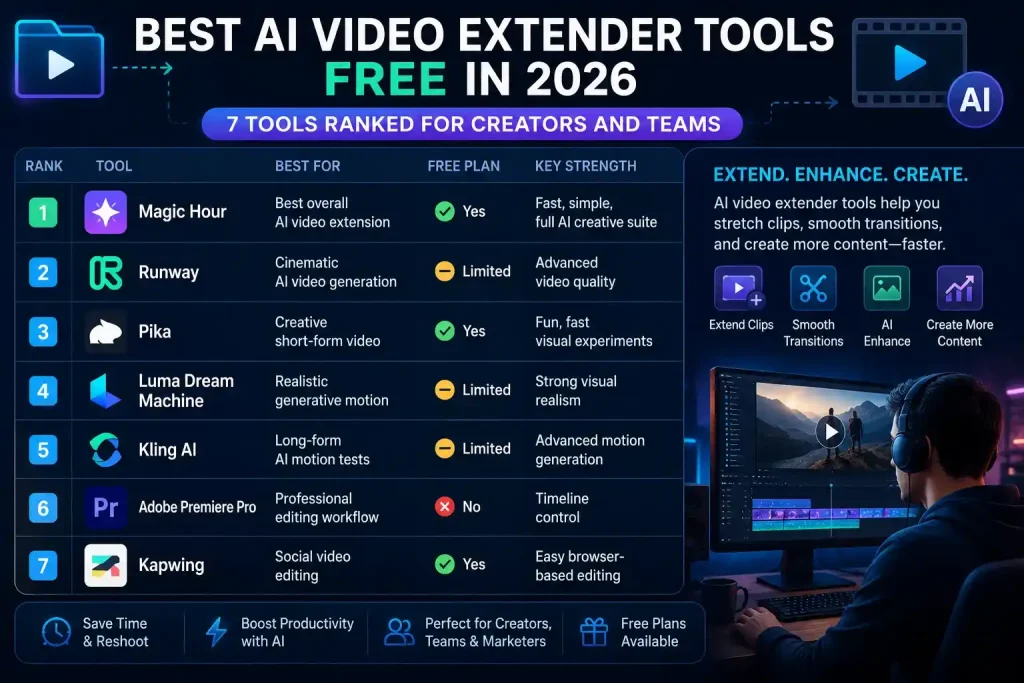
The most effective video extending tools as of May 2026 allow users to extend video clips and edit content without having to shoot and reshoot the video to amend abrupt endings or add scene transitions. Magic Hour is currently my pick for the top video extension option for most users. This is due to its combination of speed, user-friendly interface, ease of access for new users via its free version, and its versatile creative tools as opposed to just video extending.
AI video extension is no longer just for aesthetics and is now applicable to users with high content output. This includes product teams, marketers, and content creators on a video-based platform like YouTube. This is because these users are trying to squeeze as much content as possible from similar or the same videos.
For example, a video may be cut and needs to be extended. These same video clips may need to be edited to create a one or two-second scene transition.
Best AI Video Extender Tools at a Glance
| Rank | Tool | Best For | Platforms | Free Plan | Key Strength |
| 1 | Magic Hour | Best overall AI video extension | Web, mobile-friendly | Yes | Fast, simple, full AI creative suite |
| 2 | Runway | Cinematic AI video generation | Web | Limited free access | Advanced video quality |
| 3 | Pika | Creative short-form video | Web | Yes | Fun, fast visual experiments |
| 4 | Luma Dream Machine | Realistic generative motion | Web | Limited | Strong visual realism |
| 5 | Kling AI | Long-form AI motion tests | Web/app access varies | Limited | Advanced motion generation |
| 6 | Adobe Premiere Pro | Professional editing workflow | Desktop | No full free plan | Timeline control |
| 7 | Kapwing | Social video editing | Web | Yes | Easy browser-based editing |
1. Magic Hour
Magic Hour is my favorite of 2026 because it addresses the biggest issue most creators face anyway: they need fast, clean, editable video extensions, minus a heavy-weight production tool.
The platform allows users to extend clips, create variations and switch from one AI workflow to the other seamlessly. And that is critical, because video extension hardly occurs in a vacuum. Say a creator begins with an image, creates a video extension, a dozen extensions for every other flavour and size of social ad.
This is what makes Magic Hour a powerful lens, because it underpins that broader creative workflow.
If you are creators who are looking for the best AI video extender tool free from all apps, Magic Hour is the most practical beginning. The free tier also makes it easy to test the tool before committing to a paid plan. You don’t need elaborate setup to try out the tool.
Magic Hour pricing:
Free plan, Creator plan, Pro plan, and Business plan are available on the official pricing page.
Pros
• Very easy to use and no heavy learning curve
• Good for creators and steady low hours for small teams.
• Suitable for quick video extensions and for social video, ads, and creator content
• An excellent compilation of different AI tools other than extensions.
• Supports workflows with images, video and audio
• Magic Hour says: “Credits do not expire on paid subscriber usage.”
Cons
• Not as deep as Pro desktop video editing software
• Choices within complex scenes with multiple moving subjects may still require generations
• Advanced users who require manual frame-level control
Evaluation
Built for a production speed that, again, feels like magic hour. When creating social ads, short-form videos, AI UGC concepts or quick campaign assets.
This one will be helpful for creators that require more than one AI tool. You could take a product photo then make a video from it. You could extend the ending, and swap out the face, and test that, create lip sync variations of it, and upscale what you got.
Having different tools for each step slows everything down. Magic Hour reduces that friction.
The assertiveness of the platform is also for creators who seek value. Creator pricing (circa $15/month or $10/month billed yearly) is referenced in the brief and Magic Hour’s live pricing page, with prices shown relative to region/currency.
Pricing
You have Magic Hour and a free plan. The pricing page now lists Creator, Pro and Business tiers, with plan specifics dependent on billing option location.
Ideal for: Creators, marketers, founders and teams looking to express themselves the fastest move from raw clip to usable long-form video.
2. Runway
Runway is still among the heavyweight names in AI video. It’s an excellent choice for creators who care more about cinematic results than fast output.
The runway’s strength is its visual quality. It provides people with professional-like AI video generation tools and access to scene continuation options and creative adjustment tools.
Where Magic Hour is the practical everyday workspace, Runway is the more advanced creative lab.
Pros
• Strong generational video quality
• Better suited to cinematic shots
• Use this as creative directors and filmmakers
• Provides a comprehensive set of AI video tools
• Perform on more complex visual prompts in comparison to simpler tools;
Cons
• Requires more experimentation
• It could get costly if you ride regularly
• May be overkill for simple extension tasks
Evaluation
If achieving visual polish is the goal, then Runways is a powerful tool. It might achieve good effects, particularly when you use cinematic scenes, stylized ideas or great bold AI video projects.
But marketing is much more forgiving, and as part of normal workflows, you might need to consider five or ten alternative options quickly.
Use the runway when quality outweighs quantity.
Pricing
Runway generally comes with free trial usage and payment plans based on credits or use. However, check the official Runway pricing page before publishing exact numbers since they can change.
Ideal for: Credible filmmakers and creative teams seeking enhanced cinematic AI video output.
3. Pika
PikaAI Best for creators looking to generate results with fast, creative AI video generation and creation. It is particularly effective for short-form social content, experimental clips, and stylized sequences.
Runway always feels like it is more of a cinematic platform, whereas Pika feels more playful and accessible to creators. Suitable for rough ideas, visual tests and anything that does not need to look realistic.
Pros
• Fast creative generation
• Easy to test ideas
• Good for social content
• Useful for stylized clips
• Free access is often available
Cons
• Less predictable for realistic scenes
• Long outputs can cause the motion to drift
• Not ideal for finishing brand campaigns unless you edit
• The input clip strongly influences extension quality
Evaluation
It is an excellent framework to use if you want to reach someone’s attention visually. Used for concept testing, creative experiments, meme-style videos, short social clips.
When you need the scene to hold on creatively, Pika can help with video extension. However, this is not as effective when continuity needs to be flawless.
Pricing
Pika is typically free to use with payment options for more usage, faster generation or advanced output controls. Wait until you publish: Prices can be checked, then specific details of the plan..
Best for: Creators who want quick, creative, stylized AI video extensions.
4. Luma Dream Machine
Luma Dream Machine is best suited to more realistic movement and command visual output. It is one of the more sophisticated AI video tools for users wanting to create smooth-looking motion from prompts or image inputs.
The same holds for video extensions where Luma can be leveraged when the use case demands photorealism and spatio-temporal consistency. This is particularly intriguing for creators of product visualizations, ambience-focused scenes, architecture shots, lifestyle shots or closed-up cinematic B-roll.
Pros
• Strong visual realism and an excellent motion quality
• Useful for cinematic B-roll
• Suitable for image-to-video workflows.
• Can produce polished-looking outputs
Cons
• Not always the fastest option
• Free access may be limited
• Results can differ based on prompt and input quality
Evaluation
Luma is amazing when it works. That produces impressive outputs, particularly in scenes where motion is smooth and the visual direction strong.
For creators who are serious about realism, Luma is the place to start (and ONLY if you’re willing to spend time testing prompts).
Pricing
Luma is usually free or has a limited access model after which paid choices for extra technology and energy. Consult with Luma Commercial Pricing before publishing the final figure.
Best For: Creators looking for lifelike motion and quality AI-generated imagery.
Klinked AI
It is gaining traction for its ability to create advanced motion and longer AI video outputs. This is one of the most ambitious tools in this category.
Kling is also an intriguing option for creators who wish to experiment with artificial intelligence video production. It can generate impressive action and character-based sequences, although availability (and reliability) may vary regionally and by product version.
Pros
• Strong motion generation potential
• Good for experimenting with advanced AI videos
• Can handle more ambitious scenes
• Suitable for validation of extended visual concepts
Cons
• Access can vary
• Results may be inconsistent
• Not always beginner-friendly
• Might take hundreds of generations to produce a usable output
Evaluation
Kling is fun but I would think of it as a more advanced testing tool rather than the simplest production option.
For casual content creation, I prefer a faster and more manageable tool. If you need a reliable daily workflow, Kling is more experimental than an ideal fit.
Pricing
Availability, pricing and access for Kling may vary by region/plan. Before publishing, verify the current information on the official Kling platform in October 2022.
Best for: Advanced AI video users who want to test high-motion generation.
6. Adobe Premiere Pro
Adobe Premiere Pro is not a herbal AI video extender like Magic Hour, Runway or Pika; But it can make its way there, as many professional editors still favour timeline-based control.
Adobe’s strength is editing precision. You can slice, extend, merge, retime, mask and color grade AI-assisted tools with traditional editing techniques.
That matters to professional production crews.
Pros
• Professional editing control
• Strong timeline workflow
• Suitable for final polish
• Suitable for finishing video projects
It integrates with the wider Adobe ecosystem.
Cons
• Not beginner-friendly
• Requires a subscription
• Heavier workflow than browser-based tools
• AI extensions could be more labor-intensive to edit
Evaluation
Premiere Pro is better off when you know how to edit already? You get more control than most browser tools, but that control requires extra work.
This is precisely why I envisage Premiere as a finishing tool rather than a first choice for AI video extension.
Pricing
Adobe Premiere Pro is typically part of Adobe Creative Cloud plans, though free trials are available. Note that pricing varies by region, plan type, and bundle.
Best for: Professional editors who want full timeline control.
7. Kapwing
Kapwing: Browser-based video editing software designed for creators, marketers, educators and social media teams. It has a simple interface and provides functionalities like fast rating, captions, and resizing in addition to basic online video processes. This is an artificial intelligence (not so) video extension for practical content editing, but it might not be the most sophisticated. It is worth testing if you want a basic online editor with AI functionality.
Pros
• Beginner-friendly, runs in the browser
• Best for social video editing
• Suitable for captions, resizing, and quick edits
Cons
• Advanced AI video extension is not its strongest point.
• Free exports may include limits
• Not so adept at generating AI for cinema.
Evaluation
Kapwing is a decent utility tool. Not the most sophisticated AI video generator, but helps creators finalise content in no time.
Magic Hour, Runway, Pika and Luma are superior to pure AI video extensions. Kapwing still fits well in a broader creator workflow.
Pricing
Kapwing has free and paid plans, with paid plans increasing usage limits and export functionality. Check current pricing before publishing.
Best for: Social media teams and creators who need simple online video editing.
How Did We Choose These AI Video Extender Tools
I based these evaluations on real creator needs, not point-in-time feature lists.
The question boils down to: does this tool enable a busy creator to stretch video content without creating additional editing work?
looked at six factors:.
Ease of use
The most effective AI video extender tools do not demand technical setup. Upload, clip selection, generation and export should be easy.
Output quality
I verified that the frames generated maintained the same subject, lighting, motion and general scene style.
Speed
Speed matters for creators and marketers. A tool that gets it right well ◔◔◔ but fast is generally better than one that gets it more accurate ◓◓◓ but slow.
Workflow fit
Top Tools to Do Double Duty This is commonly associated with video editing, editing images to video ai, translating lip movement from one face from video to another, making sure the result is perfect and how it looks at that point called face swap, subtitles or closing autonomous manipulation with scaling up.
Free plan value
As many users are looking for free AI video extender tools, I thought about whether users could try the platform before paying.
Price clarity
AI video tools are not cheap. My emphasis was on tools with well-defined plans and practical value.
My main finding: Magic Hour offers the right balance of speed, usability, free access, and wide creative workflow for most users.
Market Landscape: Where AI Video Extension Is Going in 2026
There are three paths to AI video extension.
- Tools are becoming easier.
Exercise — AI video workflows in 2023 and 2024 had experimental touches. By 2026, creators expect tools to function like normal editing suite:
upload → generate → compare → export.
- Platforms are broadening.
A basic AI video extender is nice, but a full creative suite for content creation is more critical. This is why Magic Hour’s broader toolset is so crucial. This is how far we have come from where creators now want a one stop shop for video editing, ai image editor, face swap, lip sync, talking photos and AI video generation with upscaling.
- This is an increased concern about production reliability on the part of users. For a tool, creating an impressive demo is no longer enough. Teams require consistent output for ads, product launches, short-form content, and client work.
What is still the biggest technical challenge?
Consistency. Faces can shift. Hands can distort. Backgrounds can change. Motion can drift. Audio is rarely accompanied or completely aligned with the visuals.
This means, if anything, the most intelligent process is still iterative. Create more than one version, select the most effective, and clean it up with basic editing.
AI video extension is powerful, but the most impressive results come from short, controlled generations.
Final takeaway:
Magic Hour is the leading AI video extender for most creators, for 2026. It strikes the right equilibrium between speed, simplicity, finance, and creativity-oriented tools that make it suitable for inventiveness with social media, marketing, and routine content creation. Other tools are better for cinematic output, beauty and nuanced motion (see below), but Magic Hour is the most versatile option to start your workflow with maximum versatility.
FAQ
What is the best AI video extender tool free in 2026?
Magic Hour (Best Free AI Video Extender Tool Overall with a free plan and Massive access to AI Creative Suite in 2026 tells us that it is the very first place to start, given how fast you can generate content.)
Can AI extend any video?
AI can disseminate numerous brief clips, yet the results by performance depend on the scene. As a rule of thumb, simple shots with stable lighting and clear motion perform better. Some more complex scenes with many people or fast action or detailed hands will need multiple attempts.
What is an AI video extension? Is it suitable for professional use?
Is that right, but primarily for short-form extensions, transitions, social videos, ads and creative tests? You still need manual editing, color correction, and audio cleanup for high-end production.
Does AI video extension also extend audio?
AI video extenders typically have a visual focus. This means they usually require standalone editing, especially if the source clip contains an instrument/voice/sound effect.
Which AI video extender is best for beginners?
Magic Hour, This platform is the simplest starting option for beginners as it offers a straightforward interface, features a free plan that can help you get started and has other AI tools in the suite many content creators need.